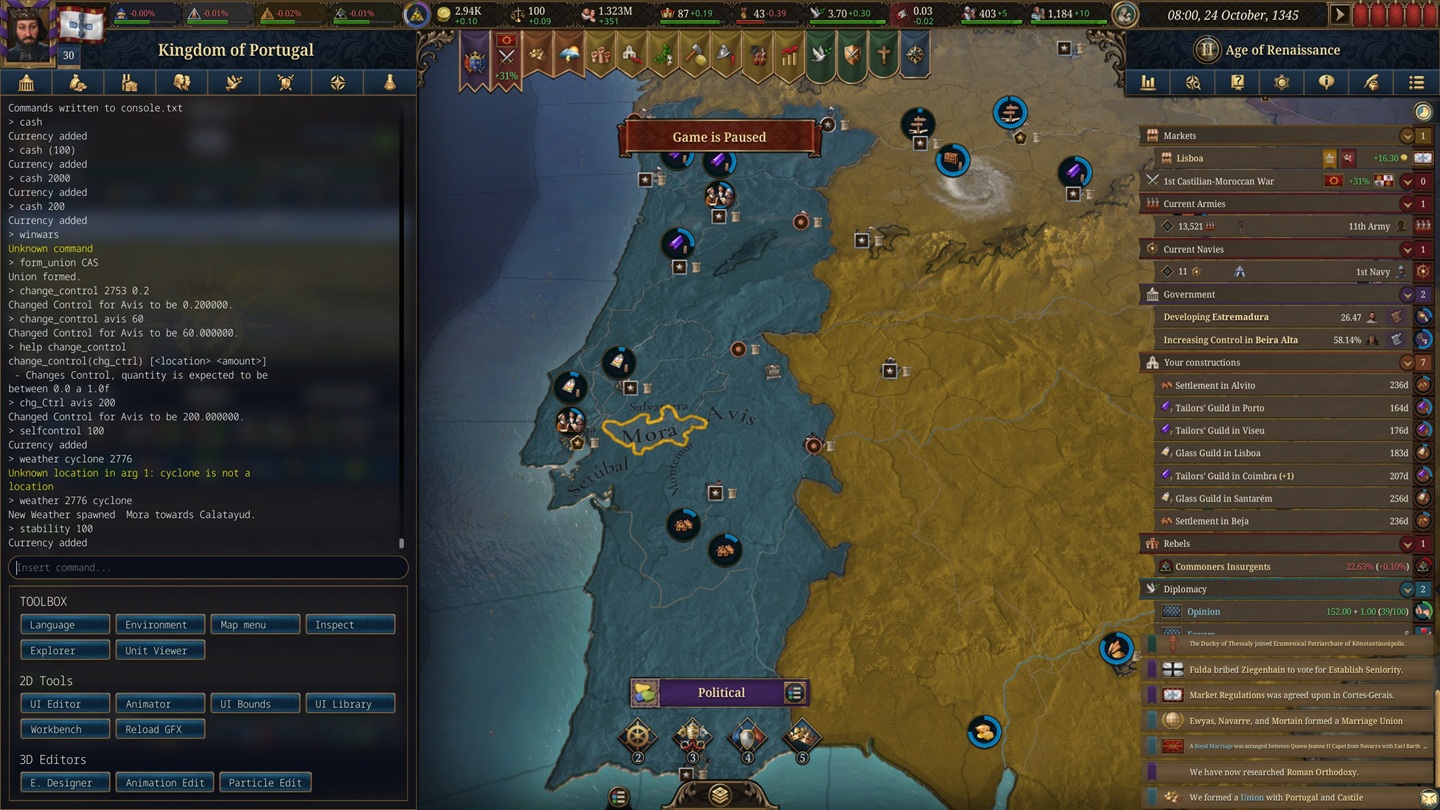
The console is the same instrument whether you are repairing a broken save, building a custom scenario, or just handing yourself a mountain of gold. What changes is which layer fails. A player who cannot open the panel at all has an access problem. A player whose command prints an error has a syntax problem. A player whose command "runs" but changes nothing usually has a target or state problem. Separate those three and troubleshooting stops being a guessing game.
The Three Layers of a Failed Command
Every console command passes through three gates, and a command only works when all three are satisfied. Diagnosing in order saves time, because the fixes do not overlap: there is no point correcting your syntax if the console is not even active.
Layer one is access. The console is not a default feature. It lives behind the -debug_mode launch option, and until that option is set and the game has been restarted, the console key does nothing at all. If pressing the key produces no panel, nothing you type matters yet. Fix access first.
Layer two is syntax. Once the panel is open, the command has to be spelled the way the current build expects, with the right arguments in the right order and no stray characters copied from a guide. The console speaks the game's internal language, not the language of the interface. This is where brackets, capitalization, and the difference between a display name and a data-file name bite people.
Layer three is target and state. A syntactically perfect command can still do nothing if the country tag, location ID, or institution key you fed it does not exist in your save, if the value you asked for is past a hard cap, if the command is a toggle you left in the wrong position, or if the change needs a daily tick or a reload before the interface catches up.
| Symptom | Failed layer | First thing to check |
|---|---|---|
| The console key does nothing | Access | Is -debug_mode set in Steam, and did you restart the game afterward? |
| The panel opens, the command prints an error | Syntax | Run help [command] and use Tab autocomplete in your own build. |
| The command runs but nothing changes | Target / state | Is the target valid, is the value capped, is it a toggle, does it need a tick? |
| It worked once, then stopped | State | You toggled something off, or debug mode itself was switched off from the console. |
| A number came out wrong | Target / state | Many values are capped or scaled; the console obeys the cap, not your input. |
Hold that ladder in mind and the rest of this guide is just detail on each rung. The single most useful habit is to read what the console prints back. An error line, a value that clamps to a maximum, or silence where you expected a change are all information. They tell you which gate the command failed at.
The Console Will Not Open
If the panel never appears, you have an access problem, and access has a short list of causes. Work them in this order.
The launch option is missing or mistyped. In your Steam Library, right-click Europa Universalis V, open Properties, and under General find Launch Options. The entry must be -debug_mode — one word, with the hyphen. A common failure is typing debug_mode without the hyphen, or debug mode as two words; neither activates the console. After editing the field, launch the game normally.
You did not restart. Launch options are read when the game starts. Editing the field while EU5 is running, or leaving a session open, changes nothing. Close the game fully and start it again.
You are pressing the wrong key. The console opens with the key immediately left of 1 on most layouts — the ~ / ` key. On non-US layouts that key can move or require a modifier, so if ~ does nothing, try the backtick `, and check which character your keyboard layout actually places left of 1 before concluding the console is broken.
You switched debug mode off from inside the console. This one surprises people. Running debug_mode as a command toggles the whole debug layer off — the purple map tooltips vanish and the console will not reopen until you restart the game with the launch option still in place. If the console worked earlier in the session and now will not open, this is the likely cause.
Fast test: set -debug_mode, restart, launch into any save, and press ~. If a panel appears on the left, access is solved and every later problem is syntax or target. If nothing appears after a fresh restart, the launch option is still not being read — re-check the spelling and the hyphen.
One note on save type: the console is a sandbox tool for ordinary, non-Ironman saves. Ironman campaigns are tied to achievement tracking, and the debug layer interferes with that. If your goal is achievements, the console is the wrong instrument; if your goal is to experiment, start or copy a normal save and keep Ironman out of it. More on the achievement side below.
The Console Opens but the Command Does Nothing
Now the panel is open and you have a command that refuses to behave. This is a syntax-or-state problem, and the usual suspects are predictable.
You copied the brackets. Command references write arguments in square brackets to show they are placeholders: cash [amount], tag [TAG]. The brackets are notation, not input. Typing cash [1000] fails. Type cash 1000. If a command "does nothing" and you typed any [ or ], that is the cause.
The command is a toggle and it is in the wrong position. A large group of EU5 commands are light switches: you run them once to enable, and run the exact same command again to disable. fast_diplo, yesman, instant_construction, ai, and debug_mode itself all behave this way. If a command seems to have "stopped working," you may simply have toggled it off without realizing, or left it on and now see behavior you did not expect. Re-enter the command to flip it back.
The change needs time or a reload. Some edits appear instantly; others only register after the game advances a day, and a few require you to reload the save. If the interface has not refreshed, let the clock tick before deciding the command failed.
You are asking for something past a cap. The console obeys the game's limits, not your ambition. Stability is hard-capped at 100 — typing stability 500 simply clamps to 100. Manpower does nothing if you are already at the manpower ceiling. When a number "does not move," check whether you are already at the maximum the game allows.
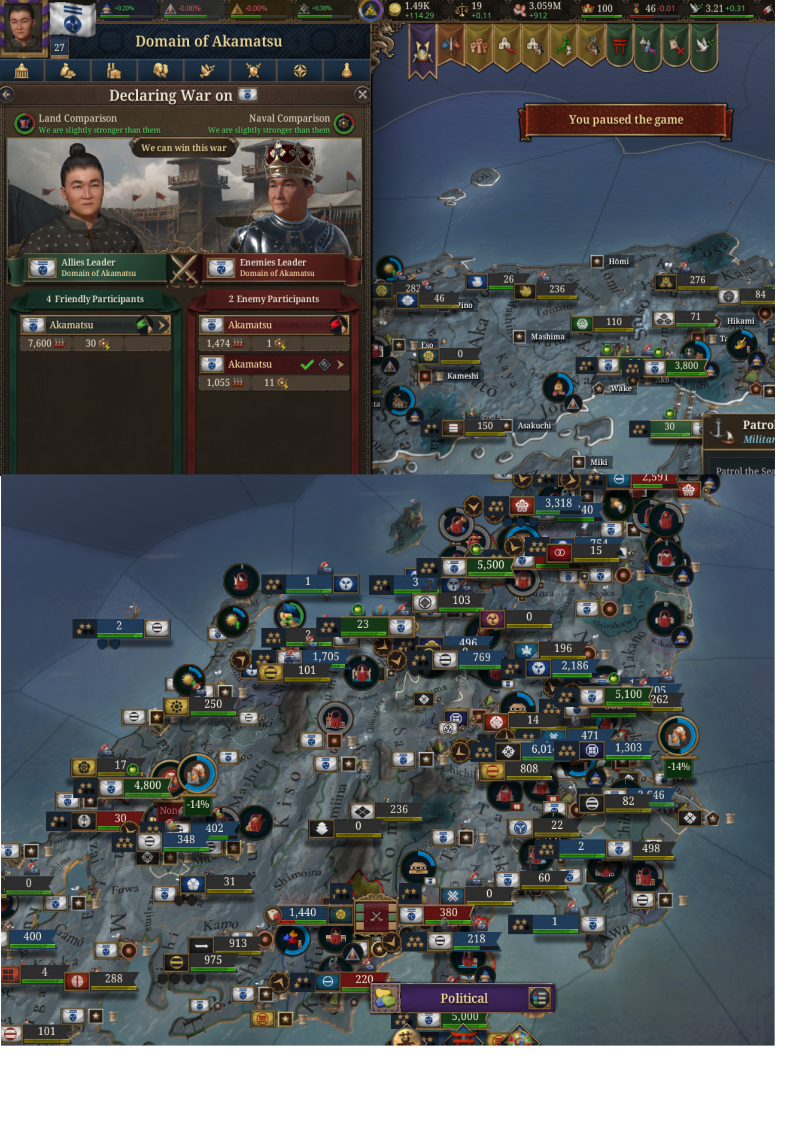
The discipline here is the same as good modding: change one thing, watch the result, then move on. If you enable instant construction, fast diplomacy, and disabled AI at the same time and the world goes sideways, you have not learned which command did what. Isolate, observe, then toggle back off.
The Target Is Invalid
This is the layer that eats the most time, because EU5 commands want precise internal identifiers and the interface never shows them by default. The fix is always the same: turn on the debug overlay and read the real ID off the map.
With debug mode active, the game paints information boxes over the map. If they are hard to read, enable Settings → User Interface → Map Tooltips so the tooltips display fully. Hover a country and you will see its tag — a short code such as FRA for France. Hover a location and you will see its location ID. Those are the exact strings commands like tag, annex, win_siege, population, and add_institution_progress expect. Do not guess them and do not type the country's full name; read them off the tooltip. The country tags and location IDs guide covers finding and using these in depth.
The console speaks the game's internal language, not its UI language. This is the single most important idea for target errors. Religion and institution commands resolve against the data-file keys inside the game, not the names shown on screen. Typing religion Buddhist fails silently, because "Buddhist" is a display label; the actual key inside the religion's data file is something like bon, and religion bon is what works. The same applies to institutions: the command wants the institution's internal name from its data folder, plus a location, plus a value.
When you need an internal name and the tooltip does not show it, the authoritative move is to dump the game's own reference. Running helplog writes a full text file listing every console command the current build supports; the output lands in the Europa Universalis V folder inside your Documents directory. That file is your contract with the game — it lists exactly what this build accepts, which beats any third-party list.
| You need | Where to get it | Why guessing fails |
|---|---|---|
| Country tag | Debug tooltip, hover the country (tag = XXX) | Commands like tag, annex, and form_union take the three-letter code, not the country name. |
| Location ID | Debug tooltip, hover the location (Map Tooltips on) | win_siege, population, and institution commands target locations by numeric ID. |
| Religion key | The religion's data file, not the UI label | religion Buddhist fails; the internal key (e.g. bon) is what resolves. |
| Institution name | The institution's data file | add_institution_progress wants the internal name, a location, and a percentage. |
| Command syntax | help [command], Tab autocomplete, helplog | The current build is the only source guaranteed to match what you are running. |
Also confirm the target actually exists in your save. A tag pulled from a wiki or another campaign may belong to a country that has not formed, has been annexed, or simply is not present in the world you are playing. If a country command does nothing, hover the map and verify the tag is live before anything else.
Commands That Do Not Do What You Expect
A few commands are genuinely misleading, because their output does not match the number you typed. Knowing these up front stops you from chasing a bug that is actually intended behavior.
| Command | What you might expect | What actually happens |
|---|---|---|
cash | Any amount of gold | No argument grants 1000; a value is capped at 999,000. |
stability | Set to any number | Hard-capped at 100. Values above clamp to 100; no argument adds 100. |
war_exhaustion | A direct 1:1 set | The value is scaled or capped; entering a large number can land far from what you typed. Use small adjustments like war_exhaustion -20 and read the result. |
manpower | Always adds manpower | Does nothing if you are already at the manpower cap. |
population [ID] [value] | More people, more power | The value is in units of 1,000. Dumping millions into a region with no food or control just creates starvation and zero control. |
instant_construction | A private building speedup | It is a shared buff — the AI builds instantly too. Pause, queue your projects, then toggle it straight back off. |
legitimacy | A direct command | No direct command exists. The back door is gpower (government power), because government power is legitimacy under the hood. |
research_all | Listed in help | It is not in the help menu, but it works — it unlocks all research and grants cabinet members. A sandbox button, not normal play. |
The pattern behind all of these is that the console is a thin layer over the game's normal rules. It can hand you values, but it still respects caps, scaling formulas, and shared mechanics. When a result looks wrong, ask whether the game is applying a limit you forgot about, rather than assuming the command is broken.
A couple of commands are simply unfinished and should not be relied on. Single-item research [id] has proven unreliable where research_all works; core [provinceID] may only reach an integrated state rather than fully coring a province. Treat those as rough edges, build your workflow around the commands that behave, and verify anything critical with help in your own build.
EU5 Is Not EU4
A quiet source of "not working" reports is muscle memory. Players who spent years in Europa Universalis IV type EU4 commands into EU5 and get errors, then assume the console is broken. It is not; the command set changed.
EU5 uses different names and different argument shapes than EU4. Many commands now use underscores — form_union, add_institution_progress, win_siege, war_on_player — where EU4 used other forms. Some EU4 staples do not exist here at all, and some EU5 commands have no EU4 equivalent. Copying a command from an EU4 guide, or from a generic "Paradox console" list that blends several games together, is a reliable way to feed the console something it does not recognize.
The cure is to stop trusting any list — including this one — as the final word, and instead ask the game directly. Three tools make this trivial:
| Tool | What it gives you |
|---|---|
version | The exact build you are running, so you know which command set applies. |
help [command] | The accepted arguments and order for one command, in this build. |
| Tab autocomplete | Live completion of command names and database keys as you type. |
helplog | A text dump of every command the current build supports, written to your Documents folder. |
Run version first and keep it in mind whenever a guide disagrees with what you see. If a command from an article fails in your game, help [command] tells you in seconds whether the name changed, the arguments changed, or the command was removed. This is the difference between troubleshooting and guessing: the game always knows what it accepts, and it will tell you.
When the Console Is Not Enough: Script Explorer
Sometimes a plain console command does not cover what you want. Maybe there is no command for the effect you need, maybe an event will not fire, maybe you want to understand why a value is what it is. The escalation path is Script Explorer, a graphical front end over the game's full scripting engine, and it is accessed from inside the open console via a dedicated button.
The mental model is that the console gives you a fixed menu of commands, while Script Explorer exposes the same triggers, effects, and variables the game itself uses. Whatever is possible in the game, you can run here. The interface is shared across Paradox titles, but the object types it lists — its "providers" — differ per game. EU5 works with locations; other titles expose countries, titles, or provinces. Do not expect the provider list from another game to match.
The three parts that matter for troubleshooting:
- The Script Runner lets you evaluate any trigger against a selected object and see a true/false result without firing an event. This is the diagnostic gold mine: if a command or event "does not work," you can test the underlying condition directly and see exactly which requirement is failing.
- The Effects tab executes any effect from the game's script documentation, including scoped chains like
ruler = { add_trait = innovative }. It has a Parse button that validates your syntax before you run it. Use it. Running an effect without parsing first is how you get silent failures and confusing results. - The Script Variables tab lists every script variable on the selected object and lets you view, add, edit, or delete values live. A separate Global Variables entry exposes game-wide variables. Changes apply immediately and propagate to dependent logic on the spot — which is powerful, and also means a careless edit can break an event chain or a journal entry mid-game.
You can also filter the object list with plain text (a country name) or raw trigger syntax (such as is_player = yes), and save those filters as presets to re-apply after switching providers. The workflow that keeps this safe is the same as everywhere else: parse before you run, change one variable at a time, and do it on a copied save rather than a campaign you care about.
Achievements, Checksum, and Clean Saves
The last class of "not working" is not about commands at all — it is about the side effects of turning debug mode on, and it trips up players who only wanted to experiment for an afternoon.
Debug mode and console use change the game's checksum and mark the session as non-standard, which affects achievement eligibility. Turning the launch option back off does not retroactively clean a save that was already played under debug mode. If achievements matter to you, keep the console out of those campaigns entirely, and do not expect an affected save to become an achievement save later. To return to a clean state, remove the -debug_mode launch option, disable any mods, restart the game, and confirm the checksum on the main menu is back to normal before you start a fresh run.
The broader habit that prevents almost every console disaster is working on copies. Before any destructive test — annexing a country, deleting units, editing global variables in Script Explorer, painting the map — make a separate save. Country switching, annexation, and variable edits are not things you want to discover on your only file. The console is a precision instrument when you isolate one change on a disposable save, and a wrecking ball when you wing it on a campaign you have spent forty hours building.
Rule of thumb: achievements and the console do not mix. Pick one. For sandbox work, copy the save, run the smallest command that proves the point, read the output, and toggle everything back off before you continue.
If you have worked the whole ladder — access confirmed, syntax checked with help, target read off the tooltip, caps and toggles accounted for, build verified with version — and a command still misbehaves, you have likely found a genuine rough edge in an early build rather than a player error. At that point, stop troubleshooting and either work around it with Script Explorer or wait for the behavior to settle in a later build. Knowing when to stop is part of using the console well.
FAQ
Why will the EU5 console not open?
You almost certainly have an access problem. Set the launch option to exactly -debug_mode (hyphen included), restart the game fully, then press the key left of 1 (~ or `). If that key does nothing on your keyboard layout, check which character sits left of 1 on it and try that key with and without modifiers.
Why does -debug_mode not work?
Check the spelling and the hyphen — debug_mode without the hyphen and debug mode as two words both fail. Then confirm you actually restarted the game after editing the launch option, since the option is only read at startup.
Why did the console stop working after it was fine?
You probably ran debug_mode as a command, which toggles the entire debug layer off. The console will not reopen until you restart the game with the launch option still in place.
Do console commands work in Ironman?
The console is a sandbox tool for normal, non-Ironman saves. Ironman is tied to achievement tracking, and the debug layer interferes with it. If you want achievements, leave the console out; if you want to experiment, use a standard save.
Why does my command say the target is invalid?
You fed it a name instead of an internal ID, or a target that does not exist in your save. Turn on the debug overlay, read the country tag or location ID off the map tooltip, and use that exact string. For religions and institutions, the command wants the data-file key, not the on-screen label.
Why do tags from a wiki or another guide not work in my save?
The country may not exist in your world — it might not have formed, or it may have been annexed. Hover the map to confirm the tag is live, and verify the command against your own build with help [command], since command names change between games and patches.
Why are achievements still disabled after I removed debug mode?
Removing the launch option does not clean a save that was already played under debug mode. Disable mods, restart, confirm the checksum on the main menu is normal, and start a fresh save. Do not expect an affected save to regain achievement eligibility.
What should I do before using destructive commands?
Make a separate save. Annexation, country switching, unit deletion, and global variable edits are not reversible on your only file. Isolate one change on a copy, read the output, then toggle everything back off.
Next Reads
- EU5 Console Commands and Cheats List (2026) - the full command reference to pair with the troubleshooting flow above.
- How to Enable Debug Mode in EU5 - the complete setup for the launch option, console keys, and the debug overlay.
- EU5 Country Tags and Location IDs Guide - find the exact tags and IDs every targeted command needs.
- EU5 Control Guide - understand the control mechanic before you edit provinces and locations.
- EU5 Estates and Crown Power Guide - the systems behind legitimacy and government power that
gpowertouches. - EU5 Beginner Guide: First 50 Years - learn the campaign systems the console is helping you test.